RECRAWL AI - MEMBER SUPPORT
-General Issues
I Could Not Enter The Member Area
To enter the member's area, you need to input your License Key first.
Note that your License Key is the Paypal email address that you used to purchase ReCrawl AI.
ERROR: The URL Has Been Submitted In The Last 7 Days
You should wait for at least 7 days to re-submit a same URL to AI crawlers again.
This is to prevent both your URL and our service getting marked as spam by AI companies due to excessive pinging to their crawler gateway point.
I Bought More Credits, But I Did Not Receive It?
This could happen if you bought credits using a different Paypal email than your License Key.
If that's the case, please contact us here so we can add the credits you just bought to your current License Key.
Ticket Subject: ReCrawl AI Credits Replenishment
Ticket Content:
- Your ReCrawl AI license key
- Paypal email that you used to buy more credits
How Long Until My Campaign Will Be Completed?
Most of the time, every campaign should be completed within 15 to 30 minutes.
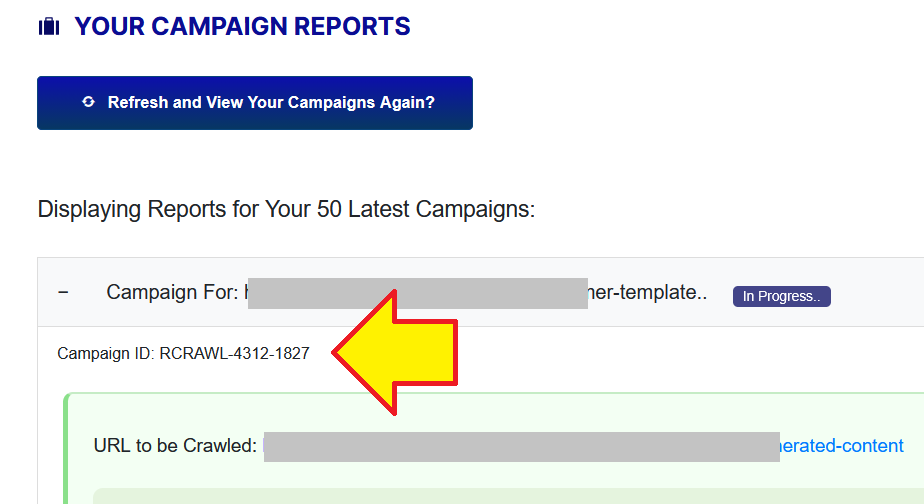
My Campaign Is "In Progress" After 30 Minutes
If after 30 minutes since its submission, a campaign is still in progress:
Locate and find the Campaign ID, after that contact us here and tell us the Campaign ID.
My Campaign Report Is Empty?
It might be because you haven't used the software at all.
If you already used the software, try to click the FETCH button.
-WordPress Plugin
Installation Failed: No Valid Plugin Found
Please unzip/extract the file that you download from your WarriorPlus purchase delivery page. After you unzip it, there will be the correct plugin ZIP file that you should upload to your website as a plugin.
Which License Key Should I Use For The WP Plugin?
You should use the Paypal email address that you used to purchase ReCrawl AI frontend offer, not the WP plugin offer.
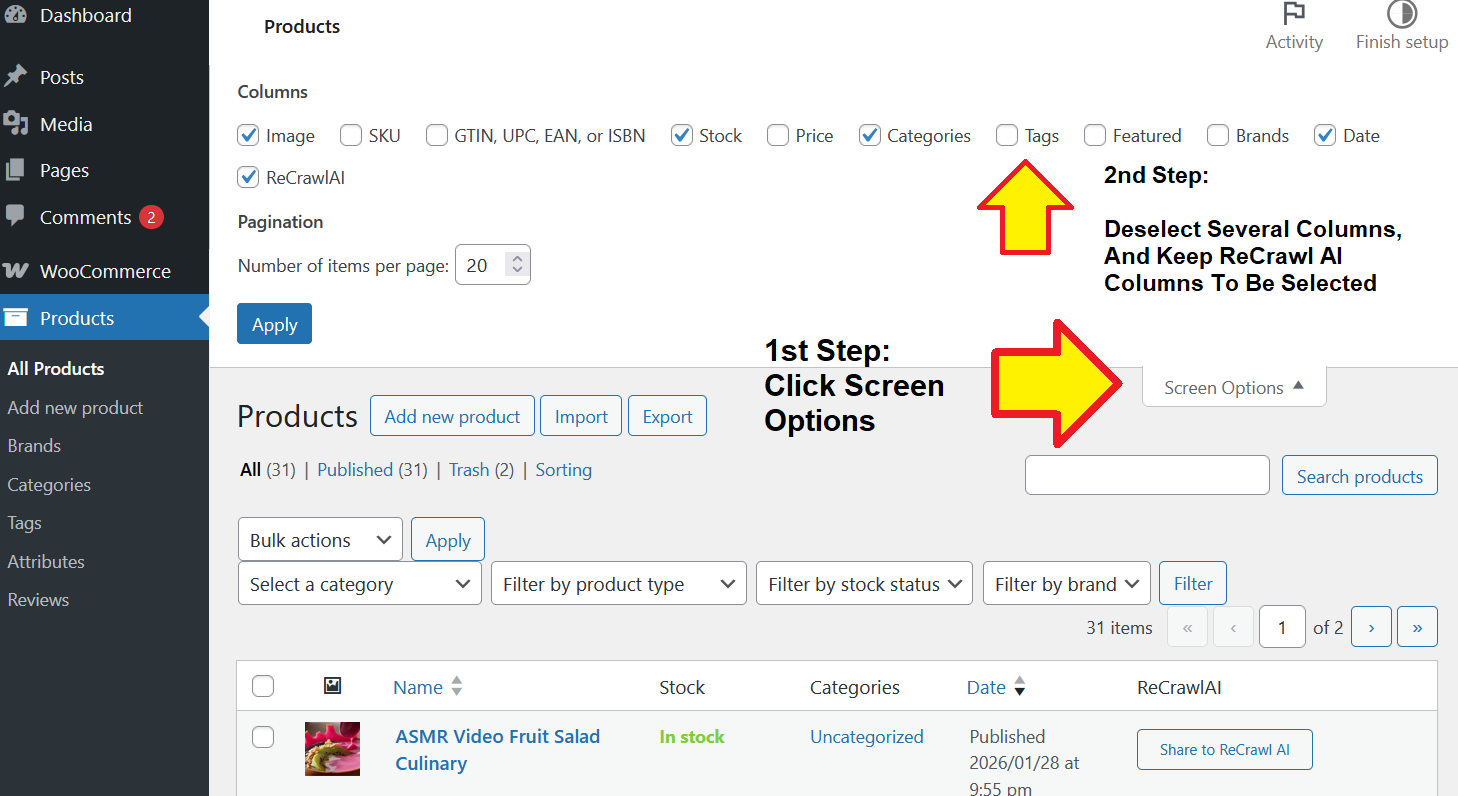
In WooCommerce Products List, The ReCrawl Share Button Is Not Displaying?
On WooCommerce Product List page, click the "screen options" selection, and reduce the number of columns.
Make sure you keep the ReCrawl AI columns to be selected.
I Got This Notice: Set to Publish First
You can only submit a Post or Page that is already published and publicly accessible. Make sure to publish the content first, then you can submit it to ReCrawl AI.
How to View Campaign Reports of My WP Submissions?
Go to ReCrawl AI dashboard:
https://cloudimtools.com/recrawl-ai-dashboard/
Navigate to the Campaign Reports section, and click the Fetch button.
All campaigns that were submitted through the WordPress plugin, will have this prefix: RCRAWL-WP
After A Submission, My Credits Are Not Decreasing?
To update your credits amount in the WP plugin version:
- Navigate to ReCrawl AI plugin settings page
- Reinput your License Key once again, and the credits amount will be refreshed automatically.
How To Update The Plugin To The Latest Version?
If there is a new version, there will be a notification inside your WP Admin Dashboard -> Updates.
From that page you can update the plugin to the latest version in one click.
Still Got Any Questions?
Extra Tools For You:


Wishing you lots of success, my friend!
Leonardus (WpThemePlugin.com)
DISCLAIMER: Each and every content materials generated by our AI engine is provided for informational and entertainment purposes only and is not a substitute for advice from a qualified professional.
Copyright © WpThemePlugin.com & CloudIMTools.com - All Rights Reserved