AI ContentChain Dashboard
Hey, welcome to AI ContentChain app dashboard.
Let's get started by creating your content right away.
Please contact us if you find any bugs or have feedbacks to improve the software. Updates on the cloud-app will be rolled out automatically. While updates on the WP version can be retrieved easily from your WP Admin -> Updates.

Use this Automatic Campaign feature so new content can be published automatically every day on 100% autopilot. You can set the auto-post campaign to run every 3 hours, 6 hours, and so on!
Our Recommended Software

Support and Troubleshooting
Can I Request A New Writing Style?
Yes, absolutely! Please contact us and tell us what writing style you would like to be added to the app.
How to Make the Software Generate Non-English Content?
Simply type the keyword with a non-English language.
Example if you have a French niche site and want to have an article about "weight loss", then type "perte de poids" on the keyword field. Or if you want to have an article about "weight loss" in German, then type "Gewichtsverlust" on the keyword field.
If this workaround doesn't work for your target language, do let us know. If necessary I can add a language selection to the software.
How to Update The Plugin To The Latest Version?
If there is a new version of AI ContentChain plugin, please download the latest version from this very page. Then you can upload the latest version file to your website.
When you see a notice "Destination folder already exists", click the "Replace current with uploaded" button.
Or navigate to WP Dashboard -> Updates, and there will be an update notice there.
When I Click The Generate Button, No Content Was Created?
In most cases it's probably because OpenAI server is getting overloaded. When it happens, you can just wait a few seconds and then try again. Also make sure your keyword is not related to adult content or hate speech related content.
And if you are using the WP version, check for plugin update thru WP Admin -> Updates.
We update our plugins regularly however there is no way for us to send notification for every updates, so please check for updates regularly on your WP website.
How to Reach Out To Support Team?
If you have any other questions, please visit our Support Desk on this address: https://wpthemeplugin.zendesk.com/hc/en-us.

DISCLAIMER: EVERY CONTENT GENERATED BY THE SOFTWARE ARE POWERED BY OPENAI AND THEIR AI GENERATED CONTENT MAY NOT ALWAYS REFLECT THE MOST CURRENT NEWS, EVENTS OR DEVELOPMENTS. WE DO NOT ASSUME ANY RESPONSIBILITY OR LIABILITY FOR THE AI CONTENT GENERATED BY OPENAI.
© Copyright CloudIMTools & WPThemePlugin
1.) Download the plugin file from the button below
2.) Log in to your WP site and navigate to Plugins -> Add New
3.) Click the "Upload Plugin" button, and upload the file
4.) Activate the plugin and navigate to ContentChain AI menu to start using it
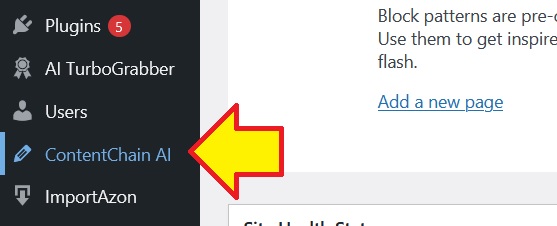
5.) Check for plugin updates first from your WP Admin -> Updates.
Update Changelog:
1.0.6 (latest version)
- Update ChatGPT model to gpt-4.5
- Add new AI engine: Google gemini-2.0-flash
- Add new AI engine: Claude 3.7 Sonnet
- Add 5 more languages: Finnish, Georgian, Irish, Malay and Swedish
1.0.5
Update AI Engine to GPT4 Omni
Add Language selection
1.0.4
Add Target Audience selection
Enhance Title randomness for Automatic Post Campaign
1.0.3
Add button to Stop Current Campaign when Automatic Post Campaign is active
1.0.2
Increase default WP CURL timeout to 60
Fix admin-ajax button for Automatic Campaign
NOTE: You can always retrieve the latest version from your WP Dashboard -> Updates, just make sure the plugin is active on your website to see the update notice.